By Ashley Szewczyk
Chinook Writer
For Casper College students, Wifi is very important for submitting assignments, accessing course materials, and speaking with instructors. When students encounter issues with Wi-Fi, the problems can snowball if not fixed quickly, which is why the Information Technology department says that knowing what network to use and who to ask for help can make a huge difference.
CC offers three main wireless networks: Casper-College, CC-Guest, and Student-Housing. Each network fills a different purpose, and understanding them can help students fix connection issues.
One of the first things that students should look at when experiencing slow Wi-Fi is which network they’re connected to.
Briahnna Dvarishkis, a network technician at CC, said sometimes students connect to the CC-Guest network without realizing it is for visitors instead of students.
“Typically we see where a lot of students haven’t been made aware that they should be on the Casper College network and not the CC guest one. We do actually limit the CC guest one.”
Dvarishkis said.
Brian Clark, CC network coordinator explained the purpose of the guest network and its restrictions.
He said, “That one is kind of just for the general public that comes in. So we do have controls around that too. So that one can’t use as much bandwidth, right? Because we want to prioritize our students over somebody in the parking lot that just shows up to use the Wifi.”
For regular campus access, students should use Casper-College. Students who live in student housing should use the Student-Housing network. Dvarishkis said both the Casper-College and Student-Housing networks require a college username and password; however, some android devices may also require additional steps to connect.
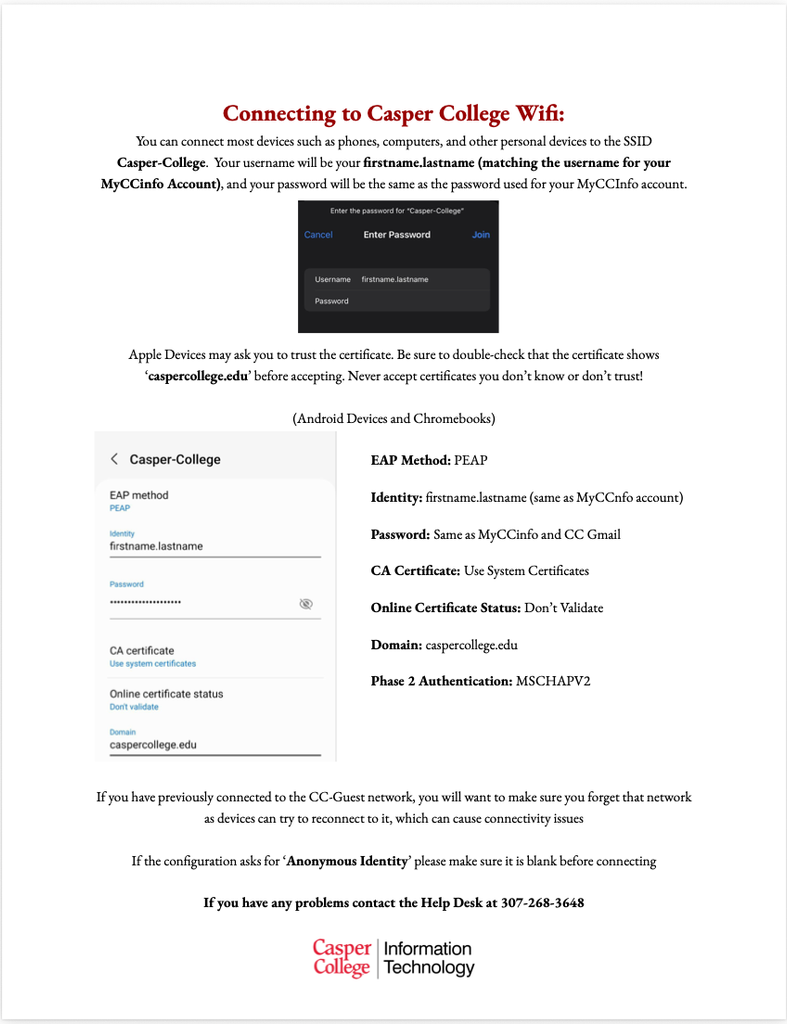
Shown above is a flyer distributed by the college’s IT department detailing how to connect to campus Wi-Fi.
According to the Casper College Information Technology connecting to the Wi-Fi on CC campus, it is essential to make sure that if you have signed in to the CC-Guest network in the past to forget the network so you can avoid connectivity issues in the future.
If checking the network doesn’t solve the problem, students should contact the IT help desk. Paridhi Gajjar, a physical therapy major who works at the help desk, completes many different tasks every single day to ensure that students are getting the help they need. Gajjar and other help desk employees are there to assist students as they work through technology problems, even when they are frustrated.
The IT help desk is one of the first places that students who are experiencing issues with their connection or logging in should go. For more complex issues, students might want to reach out to the CC networking team. Students are allowed to contact both, but the CC IT help desk offers longer hours.
Students can help the IT staff look into problems by talking about which device that they are using and if it is just their device that is having issues.
Clark encourages students to reach out rather than ignore ongoing issues. “Just reach out to us — reach out to the helpdesk (and) reach out to the networking team because we are absolutely here to make this the best experience that we can.”
CC’s main network keeps devices that are in classrooms, computer labs, offices, and personal devices running. The college separates different parts of the network into different sections for different purposes.
Owen Anderson, a work study student in the networking team said, “I noticed as a student, the nice thing is with how our network is segmented out, is our labs will never be slow, even if we’ve got 30 kids in there”
Although these sections help the college to manage issues involving the network better, it does not mean that every connection is always going to be fast. According to agencies like the FCC, a device’s settings, location, and other factors can also affect how it works.
The IT department is working on improvements to increase the campus’ internet. One change that is planned is to double the bandwidth that is available for personal devices, which will help students to get better connection with their devices.
The college is working to get fiber internet later on to give a different option for the internet. If one provider goes down, students can then still get the services they need. Knowing how to respond to internet problems can help students to be able to avoid unnecessary stress and focus on their schoolwork.
Students that are experiencing Wi-Fi problems should look to see if they are connected to the correct network first if they are experiencing issues with their Wi-Fi speed. If their issues continue, talking to the IT help desk and networking team is a great next step.
Having reliable Wi-Fi is an extremely important part of college. By choosing the correct network, talking about issues that are ongoing, and asking for help when it is needed, students can help fix connection issues of their own and others.
“Dont be afraid to ask for help,” Anderson said.